

BrailleGrip
BrailleGrip
BrailleGrip
PROJECT THEME: ENHANCING ACCESSIBILITY FOR DUAL IMPAIRMENTS
PROJECT TYPE: SELF-MOTIVATED PROJECT
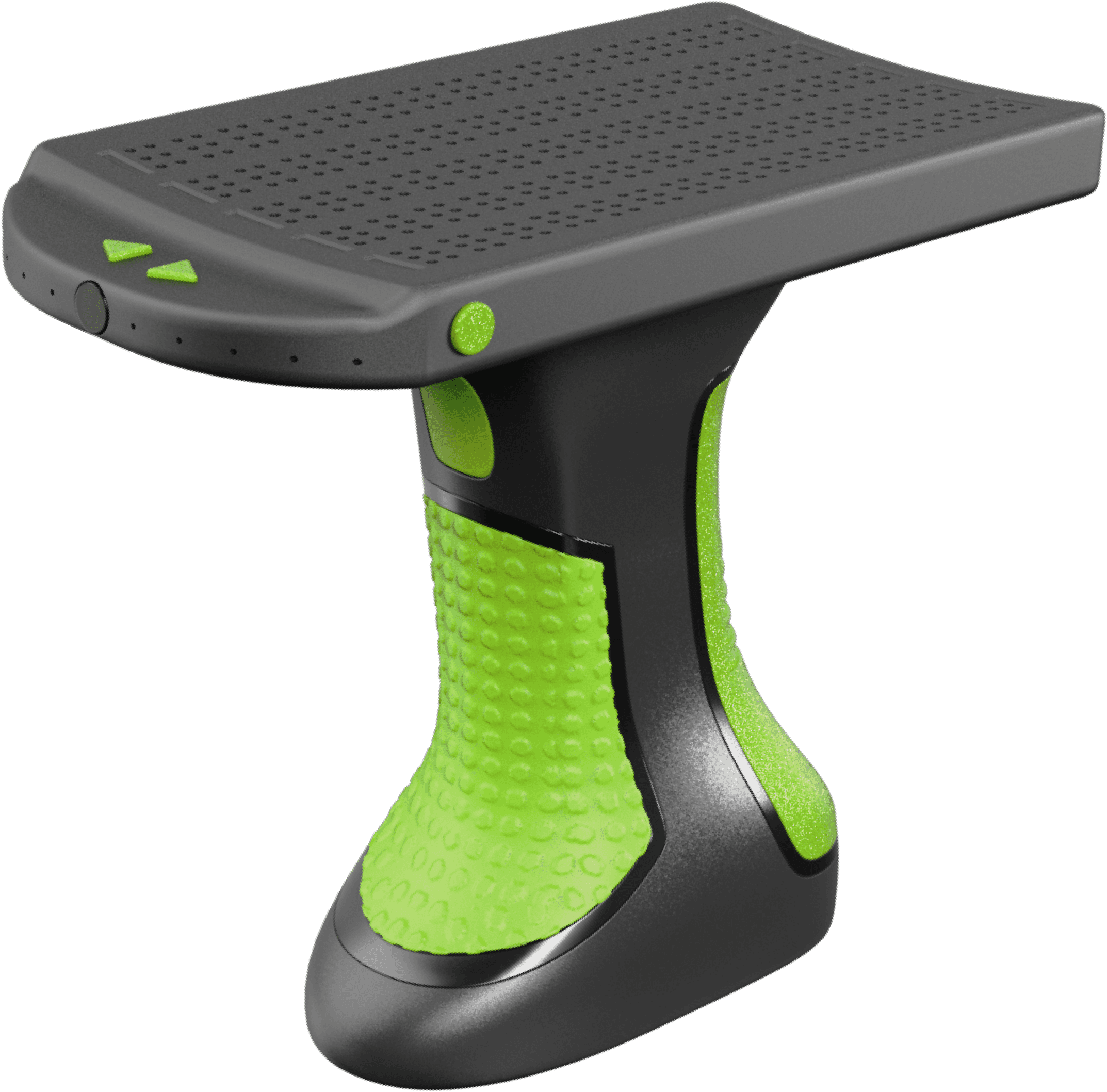
PROJECT OUTCOME: CONCEPT OF BRAILLEGRIP DEVICE
PROJECT THEME: ENHANCING ACCESSIBILITY FOR DUAL IMPAIRMENTS
PROJECT TYPE: SELF-MOTIVATED PROJECT
PROJECT OUTCOME: CONCEPT OF BRAILLEGRIP DEVICE
PROJECT THEME: ENHANCING ACCESSIBILITY FOR DUAL IMPAIRMENTS
PROJECT TYPE: SELF-MOTIVATED PROJECT
PROJECT OUTCOME: CONCEPT OF BRAILLEGRIP DEVICE
BACK STORY
BACK STORY
BACK STORY

Sight
Vision
Sight Vision
Sight
Vision
≈4.28%
≈4.28%
≈4.28%
43 million are blind, 295 million visually impaired, including amaurosis.
43 million are blind, 295 million visually impaired, including amaurosis.
43 million are blind, 295 million visually impaired, including amaurosis.

Hearing
Audition
Hearing Audition
Hearing
Audition
≈5.91%
≈5.91%
≈5.91%
466 million people have disabling hearing loss or hypoacusis.
466 million people have disabling hearing loss or hypoacusis.
466 million people have disabling hearing loss or hypoacusis.

Touch
Somatosensation
Touch Somatosensation
Touch
Somatosensation
<0.01%
<0.01%
<0.01%
At 1 in 125 million, there are approximately 63 people with CIPA.
At 1 in 125 million, there are approximately 63 people with CIPA.
At 1 in 125 million, there are approximately 63 people with CIPA.

Smell
Olfaction
Smell Olfaction
Smell
Olfaction
<0.01%
<0.01%
<0.01%
At 1 in 10,000, about 700,000 people have congenital anosmia.
At 1 in 10,000, about 700,000 people have congenital anosmia.
At 1 in 10,000, about 700,000 people have congenital anosmia.

Taste
Gustation
Taste Gustation
Taste
Gustation
≈0.15%
≈0.15%
≈0.15%
At 1 or 2 out of 1000, between 7.9 to 15.8 million people have ageusia.
At 1 or 2 out of 1000, between 7.9 to 15.8 million people have ageusia.
At 1 or 2 out of 1000, between 7.9 to 15.8 million people have ageusia.
Globally, disabilities predominantly manifest as challenges to vision and hearing—undeniably the most pivotal of the five human senses. The disproportionate impact on these essential senses not only impedes daily functioning but also significantly disrupts communication and interaction. Individuals with these impairments face barriers in effectively conveying and receiving information, highlighting the urgent need for a more inclusive and accommodating global society.
Globally, disabilities predominantly manifest as challenges to vision and hearing—undeniably the most pivotal of the five human senses. The disproportionate impact on these essential senses not only impedes daily functioning but also significantly disrupts communication and interaction. Individuals with these impairments face barriers in effectively conveying and receiving information, highlighting the urgent need for a more inclusive and accommodating global society.
Globally, disabilities predominantly manifest as challenges to vision and hearing—undeniably the most pivotal of the five human senses. The disproportionate impact on these essential senses not only impedes daily functioning but also significantly disrupts communication and interaction. Individuals with these impairments face barriers in effectively conveying and receiving information, highlighting the urgent need for a more inclusive and accommodating global society.
TRADITIONAL APPROACH - BRAILLE
TRADITIONAL APPROACH - BRAILLE
TRADITIONAL APPROACH - BRAILLE
Feel the Words
Feel the Words
Feel the Words
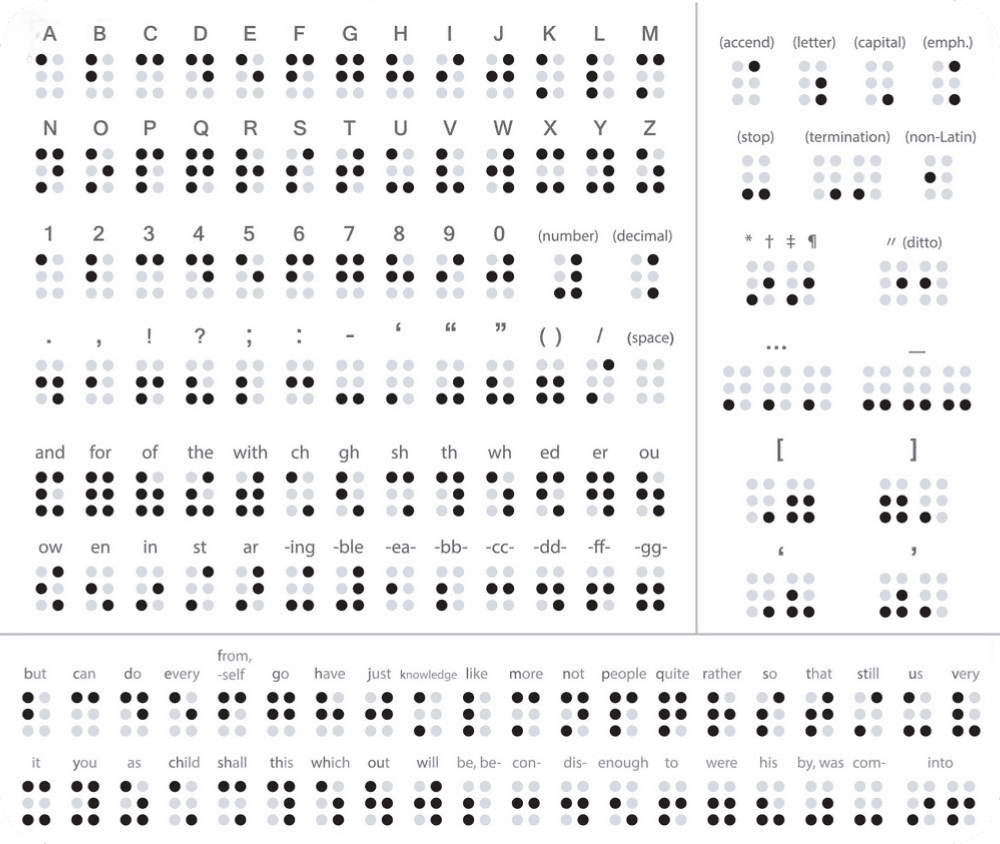
Braille, invented in the early 19th century by Louis Braille, is a tactile writing system designed for individuals with visual or hearing impairments, opening up a world of literacy through touch. This ingenious system involves feeling raised dots arranged in cells, where each cell represents letters, numbers, or punctuation. Braille characters adhere to a maximum of six dots per cell, and by mastering these distinct patterns, individuals with visual impairments gain the ability to read through the sense of touch.
Braille, invented in the early 19th century by Louis Braille, is a tactile writing system designed for individuals with visual or hearing impairments, opening up a world of literacy through touch. This ingenious system involves feeling raised dots arranged in cells, where each cell represents letters, numbers, or punctuation. Braille characters adhere to a maximum of six dots per cell, and by mastering these distinct patterns, individuals with visual impairments gain the ability to read through the sense of touch.
Braille, invented in the early 19th century by Louis Braille, is a tactile writing system designed for individuals with visual or hearing impairments, opening up a world of literacy through touch. This ingenious system involves feeling raised dots arranged in cells, where each cell represents letters, numbers, or punctuation. Braille characters adhere to a maximum of six dots per cell, and by mastering these distinct patterns, individuals with visual impairments gain the ability to read through the sense of touch.

Louis Braille
Louis Braille
Louis Braille
Braille Alphabet
Braille Alphabet
Braille Alphabet
Pros of Braille
Pros of Braille
Pros of Braille

Braille's versatility shines in diverse formats like paper, electronic displays, and metal engraving, proving valuable in settings from households to public spaces.
Braille's versatility shines in diverse formats like paper, electronic displays, and metal engraving, proving valuable in settings from households to public spaces.
Braille's versatility shines in diverse formats like paper, electronic displays, and metal engraving, proving valuable in settings from households to public spaces.

Braille's versatility shines in diverse formats like paper, electronic displays, and metal engraving, proving valuable in settings from households to public spaces.
Braille's versatility shines in diverse formats like paper, electronic displays, and metal engraving, proving valuable in settings from households to public spaces.
Braille's versatility shines in diverse formats like paper, electronic displays, and metal engraving, proving valuable in settings from households to public spaces.
Cons of Braille
Cons of Braille
Cons of Braille

Integrating Braille into public spaces like elevators, restrooms, restaurants, information kiosks, public transport, ATMs, hotels, events, streets, and libraries is expensive due to the need for specialized production and retrofitting.
Integrating Braille into public spaces like elevators, restrooms, restaurants, information kiosks, public transport, ATMs, hotels, events, streets, and libraries is expensive due to the need for specialized production and retrofitting.
Integrating Braille into public spaces like elevators, restrooms, restaurants, information kiosks, public transport, ATMs, hotels, events, streets, and libraries is expensive due to the need for specialized production and retrofitting.

Reading braille requires active engagement, as individuals must actively seek out information through touch. Sadly, when braille is not readily available, it creates a communication gap that hinders accessibility for people with impairments.
Reading braille requires active engagement, as individuals must actively seek out information through touch. Sadly, when braille is not readily available, it creates a communication gap that hinders accessibility for people with impairments.
Reading braille requires active engagement, as individuals must actively seek out information through touch. Sadly, when braille is not readily available, it creates a communication gap that hinders accessibility for people with impairments.

Keeping Braille information current is logistically challenging, as changes may happen without corresponding updates in labels and signs. Outdated Braille can be incorrect or misleading, causing inconveniences for those relying on it.
Keeping Braille information current is logistically challenging, as changes may happen without corresponding updates in labels and signs. Outdated Braille can be incorrect or misleading, causing inconveniences for those relying on it.
Keeping Braille information current is logistically challenging, as changes may happen without corresponding updates in labels and signs. Outdated Braille can be incorrect or misleading, causing inconveniences for those relying on it.
CURRENT SOLUTIONS
CURRENT SOLUTIONS
CURRENT SOLUTIONS
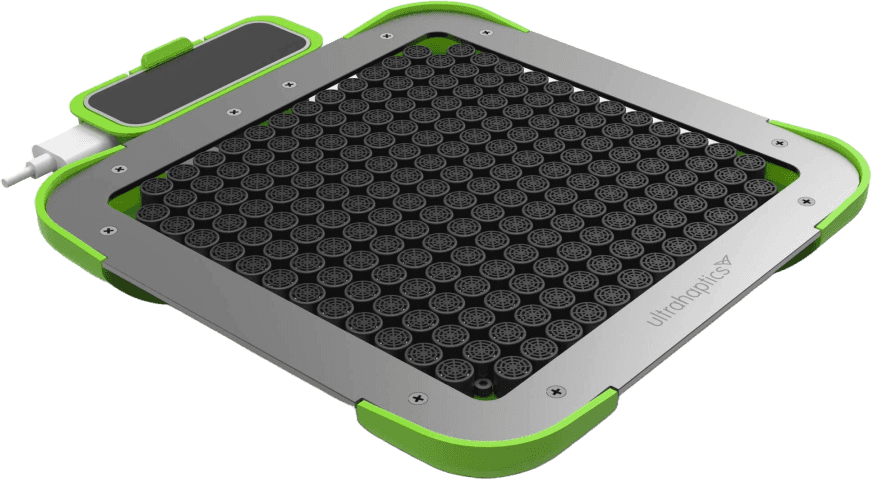
These devices utilize ultrasonic vibrational patterns to convey information, enabling users to experience virtual touch in mid-air, even though the object is not physically present.
These devices utilize ultrasonic vibrational patterns to convey information, enabling users to experience virtual touch in mid-air, even though the object is not physically present.
These devices utilize ultrasonic vibrational patterns to convey information, enabling users to experience virtual touch in mid-air, even though the object is not physically present.
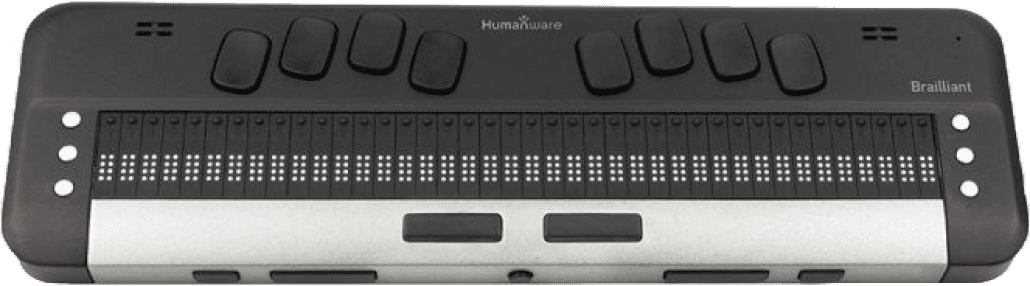
These devices utilize ultrasonic vibrational patterns to convey information, enabling users to experience virtual touch in mid-air, even though the object is not physically present.
These devices utilize ultrasonic vibrational patterns to convey information, enabling users to experience virtual touch in mid-air, even though the object is not physically present.
These devices utilize ultrasonic vibrational patterns to convey information, enabling users to experience virtual touch in mid-air, even though the object is not physically present.
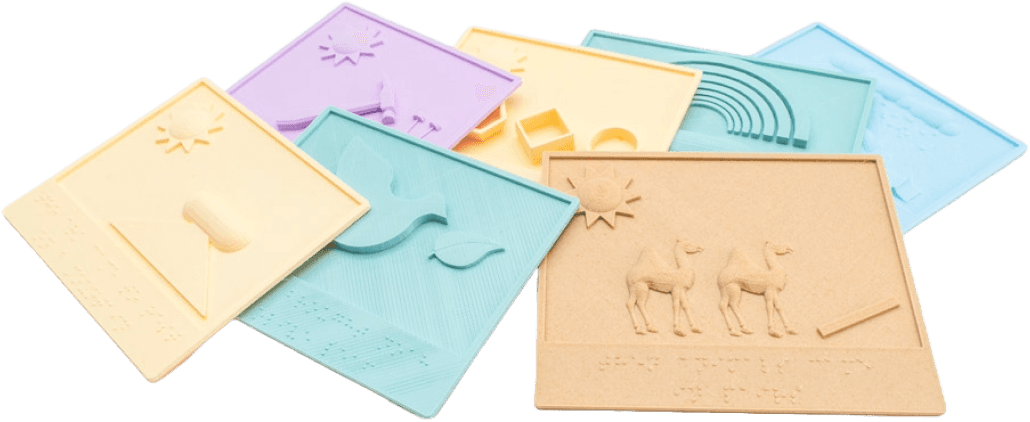
3D printing and other tactile graphic technologies allow for the creation of physical representations of images, graphs, or maps that can be explored through touch.
3D printing and other tactile graphic technologies allow for the creation of physical representations of images, graphs, or maps that can be explored through touch.
3D printing and other tactile graphic technologies allow for the creation of physical representations of images, graphs, or maps that can be explored through touch.
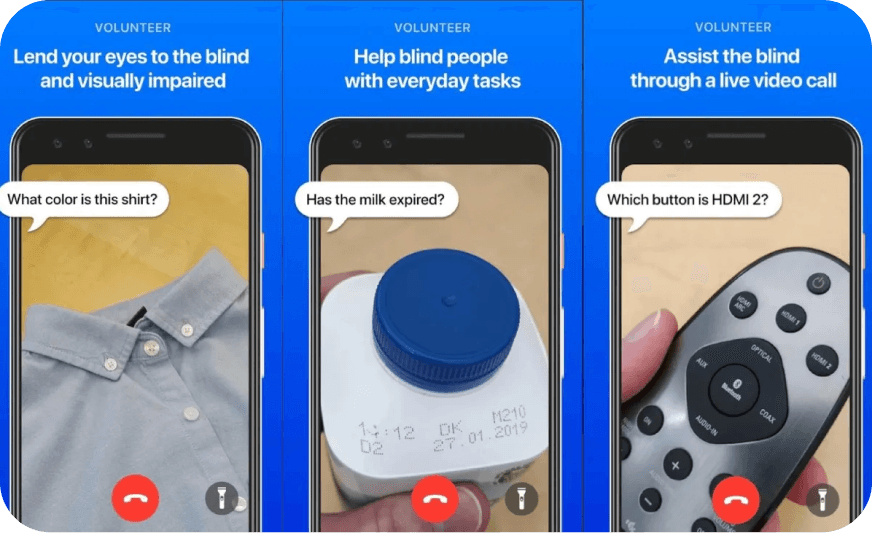
These devices utilize ultrasonic vibrational patterns to convey information, enabling users to experience virtual touch in mid-air, even though the object is not physically present.
These devices utilize ultrasonic vibrational patterns to convey information, enabling users to experience virtual touch in mid-air, even though the object is not physically present.
These devices utilize ultrasonic vibrational patterns to convey information, enabling users to experience virtual touch in mid-air, even though the object is not physically present.
LIMITATIONS AND CHALLENGES
LIMITATIONS AND CHALLENGES
LIMITATIONS AND CHALLENGES
The drawback of hardware-based devices, such as solutions 1 and 2, is their high cost, often reaching thousands of dollars. This creates a significant accessibility barrier for many potential users.
The drawback of hardware-based devices, such as solutions 1 and 2, is their high cost, often reaching thousands of dollars. This creates a significant accessibility barrier for many potential users.
The drawback of hardware-based devices, such as solutions 1 and 2, is their high cost, often reaching thousands of dollars. This creates a significant accessibility barrier for many potential users.

Most haptic devices, including solutions 1, 2, and 3, grapple with size and weight constraints, curbing their portability and designating them as less optimal for various environments.
Most haptic devices, including solutions 1, 2, and 3, grapple with size and weight constraints, curbing their portability and designating them as less optimal for various environments.
Most haptic devices, including solutions 1, 2, and 3, grapple with size and weight constraints, curbing their portability and designating them as less optimal for various environments.

The learning curve with haptic devices, including solutions 1, 2, and 4, can be challenging. Navigating these devices may not be intuitive, potentially causing inconveniences and frustration.
The learning curve with haptic devices, including solutions 1, 2, and 4, can be challenging. Navigating these devices may not be intuitive, potentially causing inconveniences and frustration.
The learning curve with haptic devices, including solutions 1, 2, and 4, can be challenging. Navigating these devices may not be intuitive, potentially causing inconveniences and frustration.

Certain physical representations, like tactile graphics, have limitations, particularly in conveying a finite amount of information on each board due to space constraints.
Certain physical representations, like tactile graphics, have limitations, particularly in conveying a finite amount of information on each board due to space constraints.
Certain physical representations, like tactile graphics, have limitations, particularly in conveying a finite amount of information on each board due to space constraints.
CONCEPTUAL BREAKTHROUGH
CONCEPTUAL BREAKTHROUGH
CONCEPTUAL BREAKTHROUGH
Synopsis
Synopsis
Synopsis
Researching current solutions for the visually and hearing impaired revealed a gap in the market. Existing options are often costly, bulky, and limited to home use. Portable solutions like phone apps exist but are limited. Recognizing this, there's a critical need for a specialized portable device to efficiently translate and deliver information, offering a more accessible and versatile solution for users with impairments.
Researching current solutions for the visually and hearing impaired revealed a gap in the market. Existing options are often costly, bulky, and limited to home use. Portable solutions like phone apps exist but are limited. Recognizing this, there's a critical need for a specialized portable device to efficiently translate and deliver information, offering a more accessible and versatile solution for users with impairments.
Researching current solutions for the visually and hearing impaired revealed a gap in the market. Existing options are often costly, bulky, and limited to home use. Portable solutions like phone apps exist but are limited. Recognizing this, there's a critical need for a specialized portable device to efficiently translate and deliver information, offering a more accessible and versatile solution for users with impairments.
Back to Braille
Back to Braille
Back to Braille
After comparing solutions, Braille stands out as the optimal approach, especially for individuals with dual impairments. Widely known and easy to learn, its consistent accuracy and success in displays make it the most effective means of communication. To create a comprehensive solution, I propose using Braille as the foundation for the development of this portable device, ensuring both effectiveness and accessibility.
After comparing solutions, Braille stands out as the optimal approach, especially for individuals with dual impairments. Widely known and easy to learn, its consistent accuracy and success in displays make it the most effective means of communication. To create a comprehensive solution, I propose using Braille as the foundation for the development of this portable device, ensuring both effectiveness and accessibility.
After comparing solutions, Braille stands out as the optimal approach, especially for individuals with dual impairments. Widely known and easy to learn, its consistent accuracy and success in displays make it the most effective means of communication. To create a comprehensive solution, I propose using Braille as the foundation for the development of this portable device, ensuring both effectiveness and accessibility.
Design Specification - Things Considered
Design Specification - Things Considered
Design Specification - Things Considered
Portability
Portability
Portability
Form Factor
Form Factor
Form Factor
Carrying Options & Foldability
Carrying Options & Foldability
Carrying Options & Foldability
Weight & Balance
Weight & Balance
Weight & Balance
Water Resistance
Water Resistance
Water Resistance
Battery Life & Recharge Time
Battery Life & Recharge Time
Battery Life & Recharge Time
Functionality
Functionality
Functionality
Voice and Visual Recognition
Voice and Visual Recognition
Voice and Visual Recognition
Translation to Braille
Translation to Braille
Translation to Braille
Braille Feedback
Braille Feedback
Braille Feedback
Button Function Designs
Button Function Designs
Button Function Designs
Offline Functionality
Offline Functionality
Offline Functionality
Ergonomics
Ergonomics
Ergonomics
Overall Shape & User Comfort
Overall Shape & User Comfort
Overall Shape & User Comfort
Button Shape & Placement
Button Shape & Placement
Button Shape & Placement
Braille Interface
Braille Interface
Braille Interface
Texture & Material
Texture & Material
Texture & Material
Handedness
Handedness
Handedness
Aesthetics
Aesthetics
Aesthetics
Shape & Proportion
Shape & Proportion
Shape & Proportion
Color & Contrast
Color & Contrast
Color & Contrast
Material Finishes
Material Finishes
Material Finishes
Balance
Balance
Balance
Cultural Sensitivity
Cultural Sensitivity
Cultural Sensitivity
Cost
Cost
Cost
Materials
Materials
Materials
Electronics
Electronics
Electronics
Standardization
Standardization
Standardization
Manufacturing Processes
Manufacturing Processes
Manufacturing Processes
Maintenance & Repair
Maintenance & Repair
Maintenance & Repair
Tech Integration
Tech Integration
Tech Integration
User Interface Placement
User Interface Placement
User Interface Placement
Power Source Accessibility
Power Source Accessibility
Power Source Accessibility
Components Distribution
Components Distribution
Components Distribution
Wiring Management
Wiring Management
Wiring Management
Ventilation & Cooling
Ventilation & Cooling
Ventilation & Cooling
Drawn Inspirations
Drawn Inspirations
Drawn Inspirations
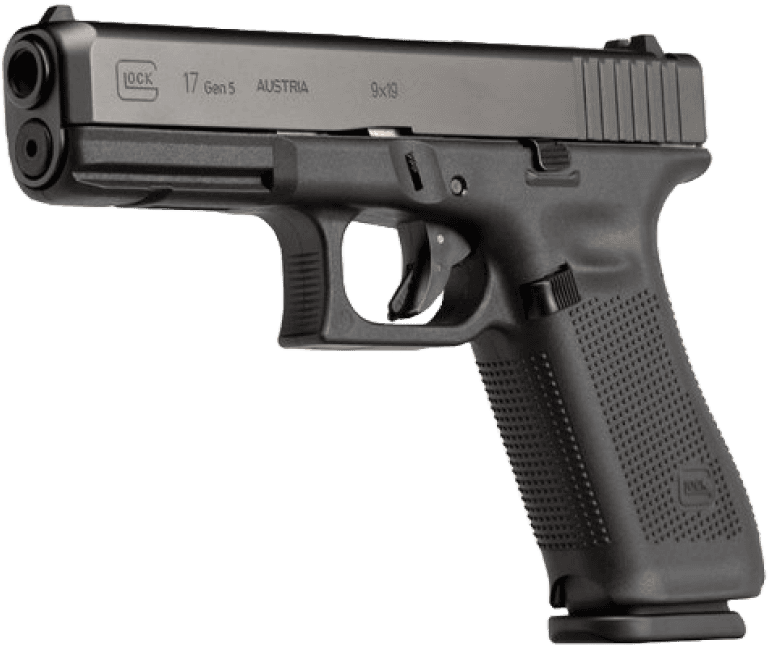
Drawing inspiration from the handle of a Glock handgun may sound surprising, but bear with me. Crafted from a resilient composite material, the ambidextrous handle boasts exceptional ergonomics, providing users with a firm and comfortable grip. This design ensures a secure hold for all, and this ergonomic excellence led me to build the entire device around a handle of this caliber.
Drawing inspiration from the handle of a Glock handgun may sound surprising, but bear with me. Crafted from a resilient composite material, the ambidextrous handle boasts exceptional ergonomics, providing users with a firm and comfortable grip. This design ensures a secure hold for all, and this ergonomic excellence led me to build the entire device around a handle of this caliber.
Drawing inspiration from the handle of a Glock handgun may sound surprising, but bear with me. Crafted from a resilient composite material, the ambidextrous handle boasts exceptional ergonomics, providing users with a firm and comfortable grip. This design ensures a secure hold for all, and this ergonomic excellence led me to build the entire device around a handle of this caliber.
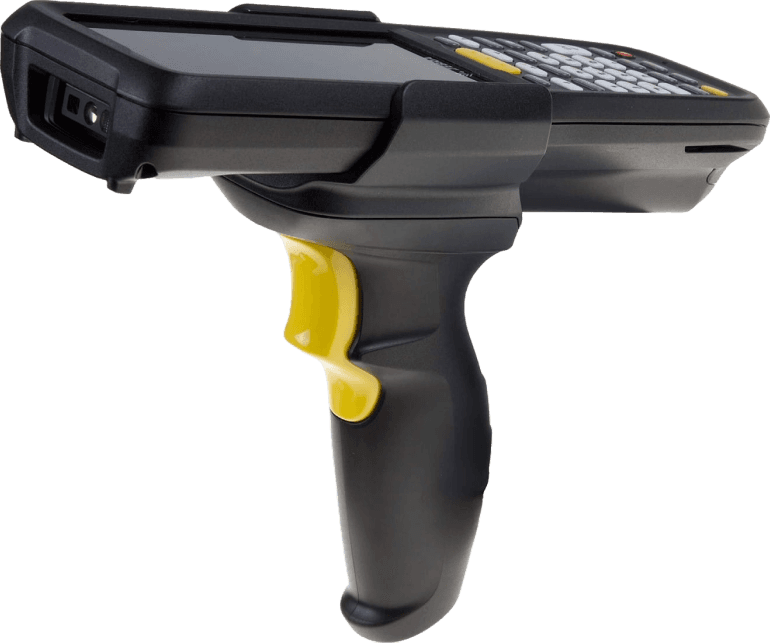
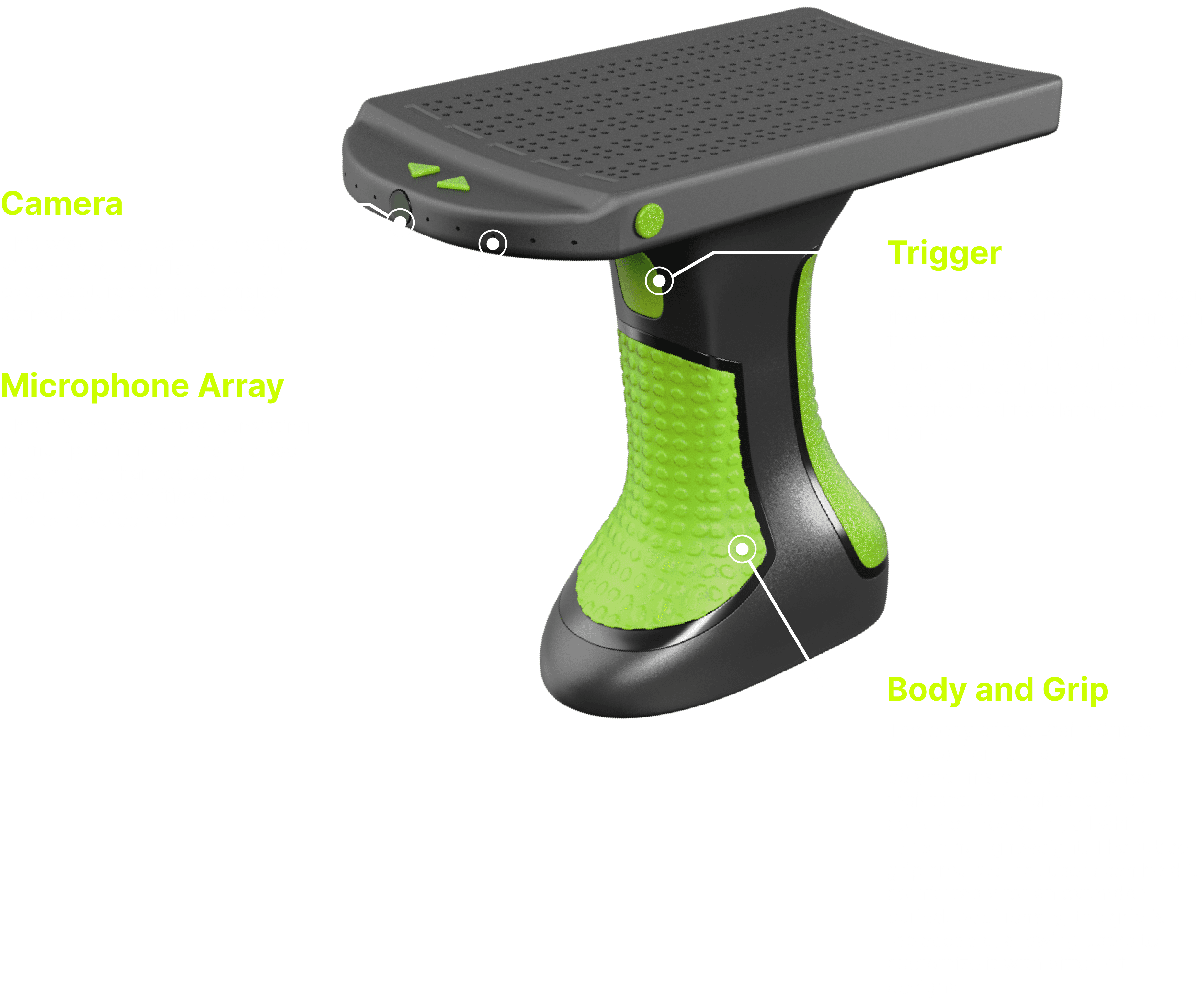
Inspired by advanced barcode scanners, the idea led me to design a product that includes a front camera for capturing surroundings. A quick trigger pull enables users to snap a picture, and the device utilizes computer vision to translate and then optimize it into Braille, displaying the information on the dedicated interface on top for instant accessibility.
Inspired by advanced barcode scanners, the idea led me to design a product that includes a front camera for capturing surroundings. A quick trigger pull enables users to snap a picture, and the device utilizes computer vision to translate and then optimize it into Braille, displaying the information on the dedicated interface on top for instant accessibility.
Inspired by advanced barcode scanners, the idea led me to design a product that includes a front camera for capturing surroundings. A quick trigger pull enables users to snap a picture, and the device utilizes computer vision to translate and then optimize it into Braille, displaying the information on the dedicated interface on top for instant accessibility.
BRAILLE INTERFACE SELECTION
BRAILLE INTERFACE SELECTION
BRAILLE INTERFACE SELECTION
Traditional Mechanical Braille
Traditional Mechanical Braille
Traditional Mechanical Braille
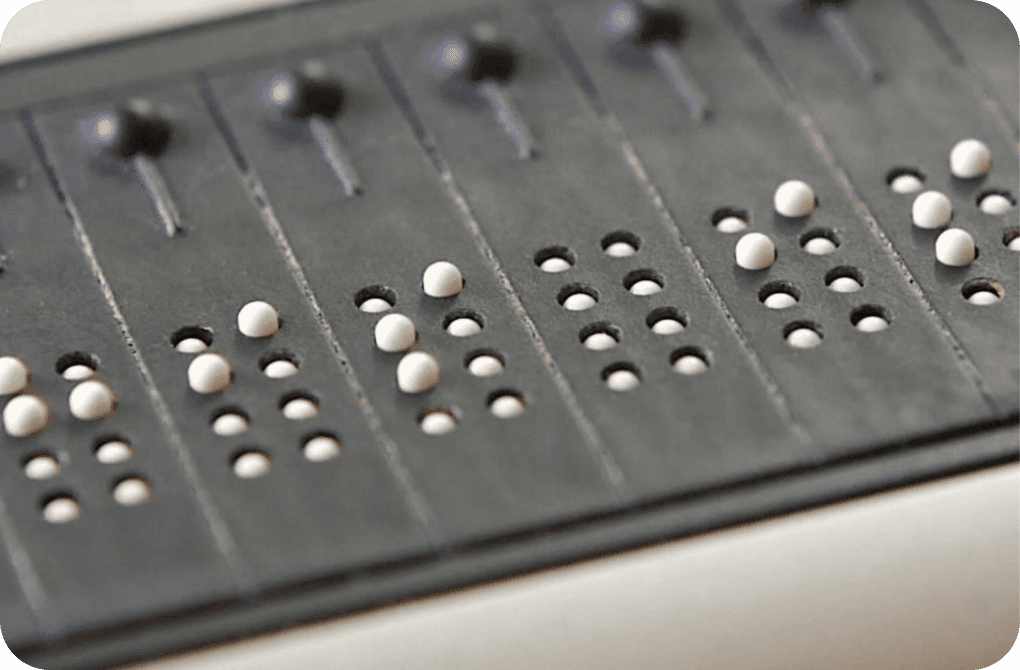
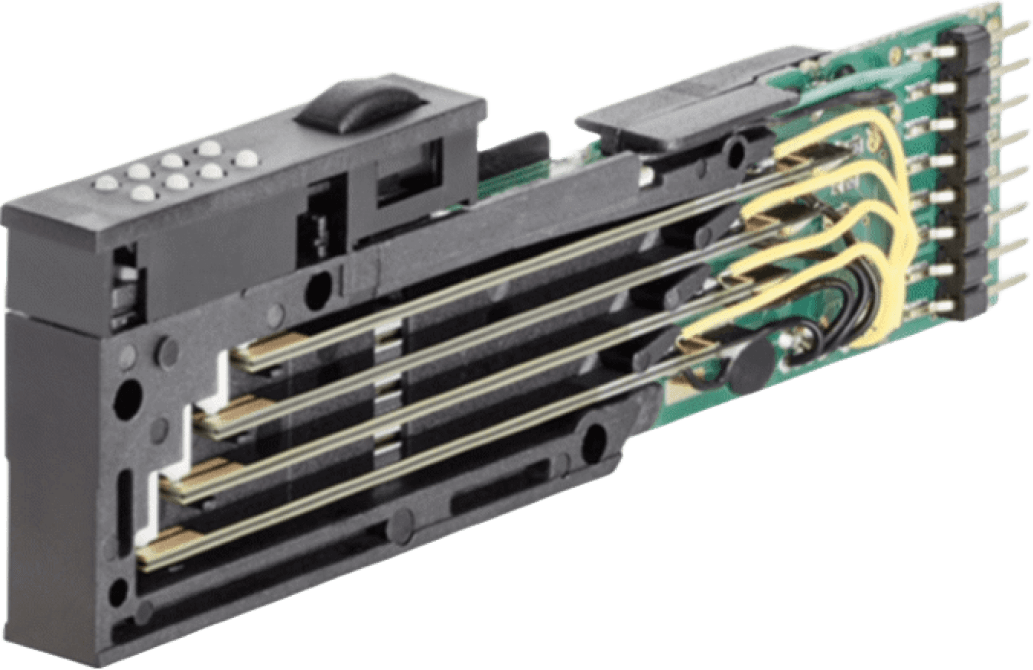
Piezoelectric Actuators
Piezoelectric Actuators
This type of interface employs a mechanical mechanism wherein small pins or dots can be individually raised or lowered to form Braille characters. The process is typically achieved through piezoelectric actuators, utilizing piezo crystals, which are exceptionally scarce on our planet, leading to a high production cost. Importantly, each Braille interface may require hundreds of these piezoelectric actuators.
This type of interface employs a mechanical mechanism wherein small pins or dots can be individually raised or lowered to form Braille characters. The process is typically achieved through piezoelectric actuators, utilizing piezo crystals, which are exceptionally scarce on our planet, leading to a high production cost. Importantly, each Braille interface may require hundreds of these piezoelectric actuators.
This type of interface employs a mechanical mechanism wherein small pins or dots can be individually raised or lowered to form Braille characters. The process is typically achieved through piezoelectric actuators, utilizing piezo crystals, which are exceptionally scarce on our planet, leading to a high production cost. Importantly, each Braille interface may require hundreds of these piezoelectric actuators.
Other Mechanical Braille
Other Mechanical Braille
Other Mechanical Braille
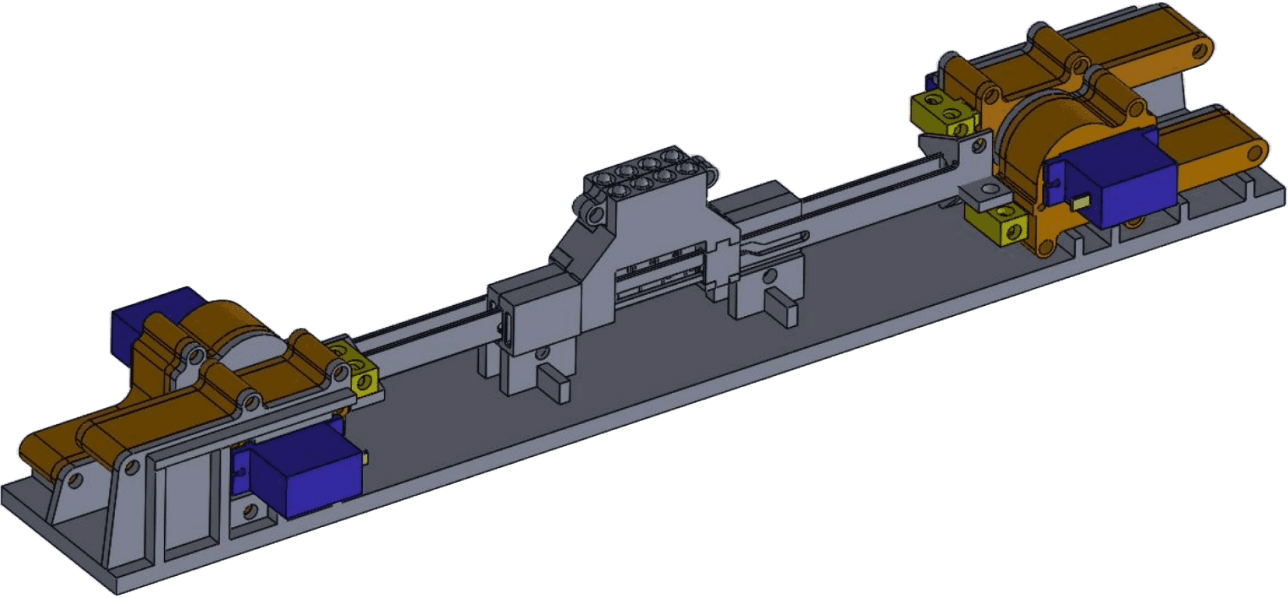
Piezoelectric Actuators
Piezoelectric Actuators
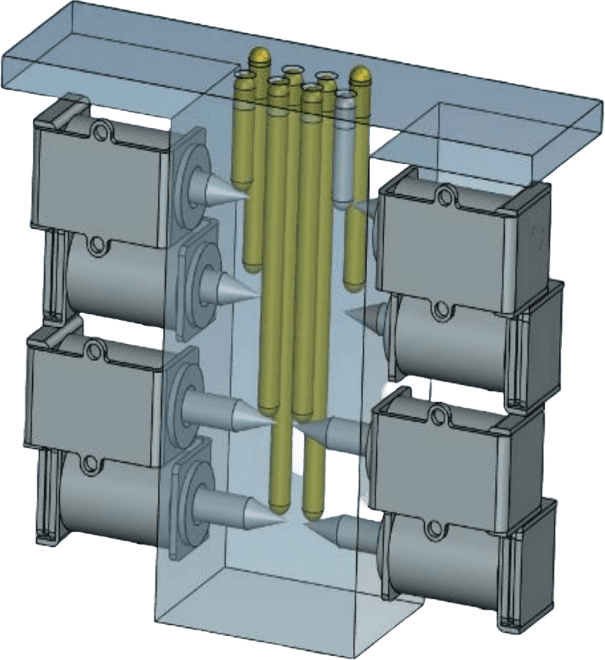
Piezoelectric Actuators
Piezoelectric Actuators
While several alternative actuator options, such as linear and electromagnetic actuators, emerge later on with a focus on reducing production costs, it's important to note that even the traditional approach is inherently complex. These alternatives, despite their cost-reduction benefits, introduce additional points of failure due to their inherent intricacy.
While several alternative actuator options, such as linear and electromagnetic actuators, emerge later on with a focus on reducing production costs, it's important to note that even the traditional approach is inherently complex. These alternatives, despite their cost-reduction benefits, introduce additional points of failure due to their inherent intricacy.
While several alternative actuator options, such as linear and electromagnetic actuators, emerge later on with a focus on reducing production costs, it's important to note that even the traditional approach is inherently complex. These alternatives, despite their cost-reduction benefits, introduce additional points of failure due to their inherent intricacy.
Touch Actuators: A New Direction in Braille Interface
Touch Actuators: A New Direction in Braille Interface
Touch Actuators: A New Direction in Braille Interface
Shifting From Mechanical to Electrical
Shifting From Mechanical to Electrical
Shifting From Mechanical to Electrical
Due to numerous inherent challenges in mechanical Braille actuator design—such as high production costs, low reliability, slow response time, noise generation, limited customization, etc.—everyone is diligently working on improving the mechanical design. However, I am taking a whole different approach. I am actively exploring a transition to an electrical approach, seeking to address these challenges from a new perspective and pave the way for more efficient and adaptable Braille interfaces.
Due to numerous inherent challenges in mechanical Braille actuator design—such as high production costs, low reliability, slow response time, noise generation, limited customization, etc.—everyone is diligently working on improving the mechanical design. However, I am taking a whole different approach. I am actively exploring a transition to an electrical approach, seeking to address these challenges from a new perspective and pave the way for more efficient and adaptable Braille interfaces.
Due to numerous inherent challenges in mechanical Braille actuator design—such as high production costs, low reliability, slow response time, noise generation, limited customization, etc.—everyone is diligently working on improving the mechanical design. However, I am taking a whole different approach. I am actively exploring a transition to an electrical approach, seeking to address these challenges from a new perspective and pave the way for more efficient and adaptable Braille interfaces.



The Core Concept
The Core Concept
The Core Concept
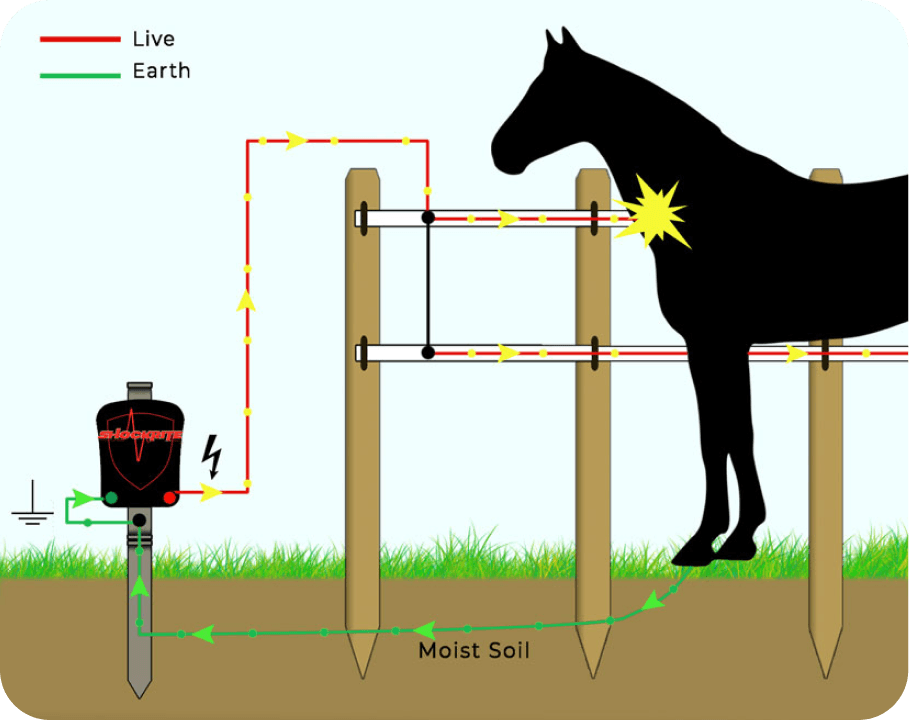
Inspired by the basic circuit concept of an electric fence—where contact with a continuous loop of wire completes the circuit, delivering a deterrent shock—I am applying this idea to haptic technology. In specific scenarios, employing carefully tuned voltage levels, akin to the electric fence's design, allows for simulating a controlled sense of touch.
Inspired by the basic circuit concept of an electric fence—where contact with a continuous loop of wire completes the circuit, delivering a deterrent shock—I am applying this idea to haptic technology. In specific scenarios, employing carefully tuned voltage levels, akin to the electric fence's design, allows for simulating a controlled sense of touch.
Inspired by the basic circuit concept of an electric fence—where contact with a continuous loop of wire completes the circuit, delivering a deterrent shock—I am applying this idea to haptic technology. In specific scenarios, employing carefully tuned voltage levels, akin to the electric fence's design, allows for simulating a controlled sense of touch.
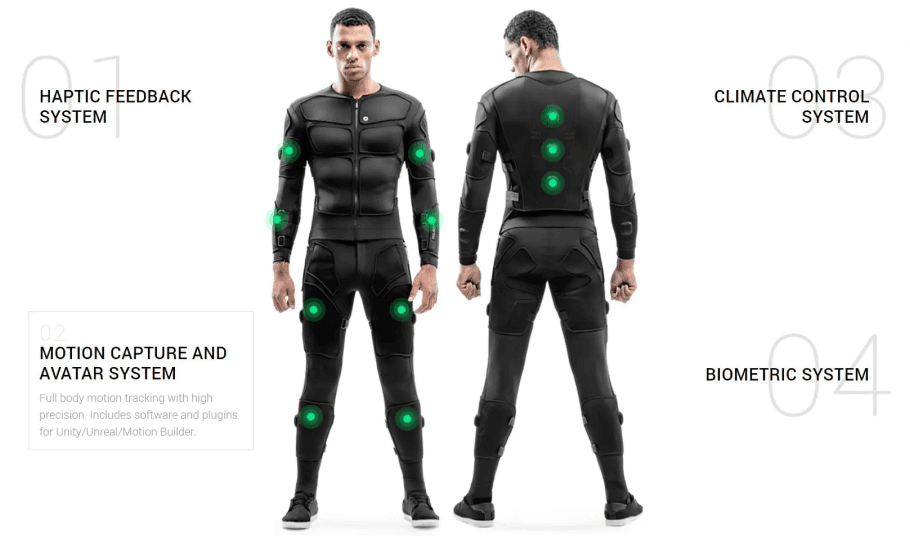
In fact, this technology has seen prior use. For example, the "TeslaSuit," a haptic suit designed for virtual reality experiences, utilizes electrical stimulation to deliver precise and controlled sensations, enhancing the overall immersive experience through simulated touch and feedback.
In fact, this technology has seen prior use. For example, the "TeslaSuit," a haptic suit designed for virtual reality experiences, utilizes electrical stimulation to deliver precise and controlled sensations, enhancing the overall immersive experience through simulated touch and feedback.
In fact, this technology has seen prior use. For example, the "TeslaSuit," a haptic suit designed for virtual reality experiences, utilizes electrical stimulation to deliver precise and controlled sensations, enhancing the overall immersive experience through simulated touch and feedback.
Introducing Touch Actuators
Introducing Touch Actuators
Introducing Touch Actuators
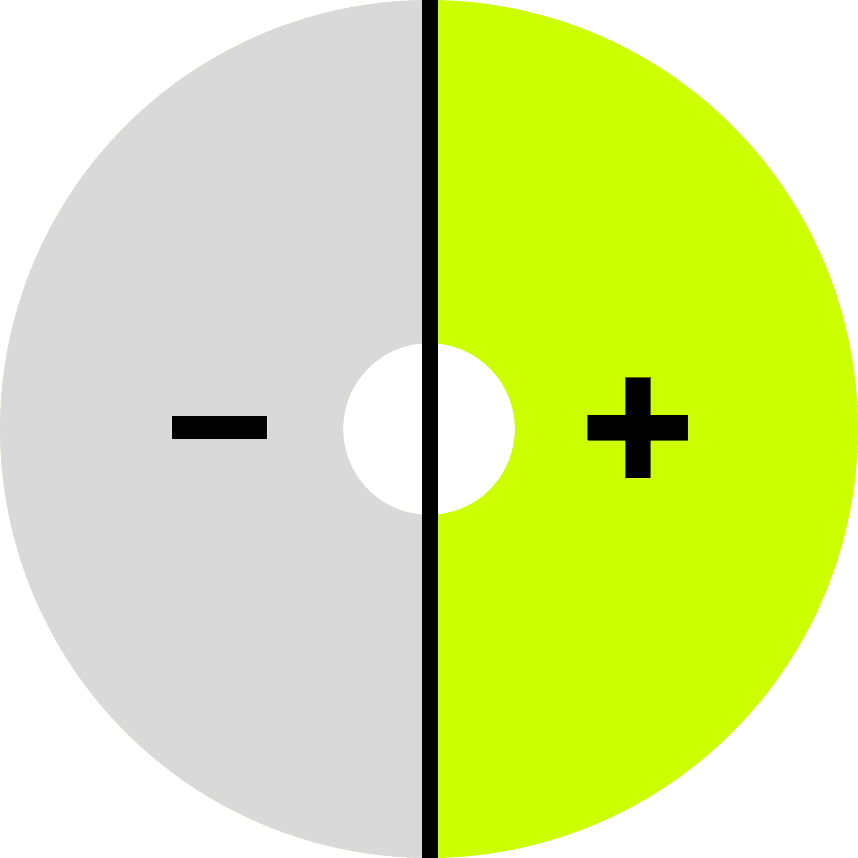
Presenting the Touch Actuators, a concept I am developing. They consist of two half-circle metal contact surfaces — the left half is negative, and the right half is positive. A small gap between these surfaces keeps them unconnected. When the fingertip makes contact, completing the circuit, a small amount of current flows through the fingertip, allowing users to experience a sense of touch, similar to mechanical actuators.
Presenting the Touch Actuators, a concept I am developing. They consist of two half-circle metal contact surfaces — the left half is negative, and the right half is positive. A small gap between these surfaces keeps them unconnected. When the fingertip makes contact, completing the circuit, a small amount of current flows through the fingertip, allowing users to experience a sense of touch, similar to mechanical actuators.
Presenting the Touch Actuators, a concept I am developing. They consist of two half-circle metal contact surfaces — the left half is negative, and the right half is positive. A small gap between these surfaces keeps them unconnected. When the fingertip makes contact, completing the circuit, a small amount of current flows through the fingertip, allowing users to experience a sense of touch, similar to mechanical actuators.
Touch Actuator (Top View)
Touch Actuator (Top View)
Touch Actuator (Top View)

The Touch Actuator remains a conceptual idea, with no formal testing being conducted. As it is not the main focus of the project, it serves as an highly possible alternative solution for the Braille interface.
The Touch Actuator remains a conceptual idea, with no formal testing being conducted. As it is not the main focus of the project, it serves as an highly possible alternative solution for the Braille interface.
The Touch Actuator remains a conceptual idea, with no formal testing being conducted. As it is not the main focus of the project, it serves as an highly possible alternative solution for the Braille interface.
Touch Actuators Array
Touch Actuators Array
Touch Actuators Array
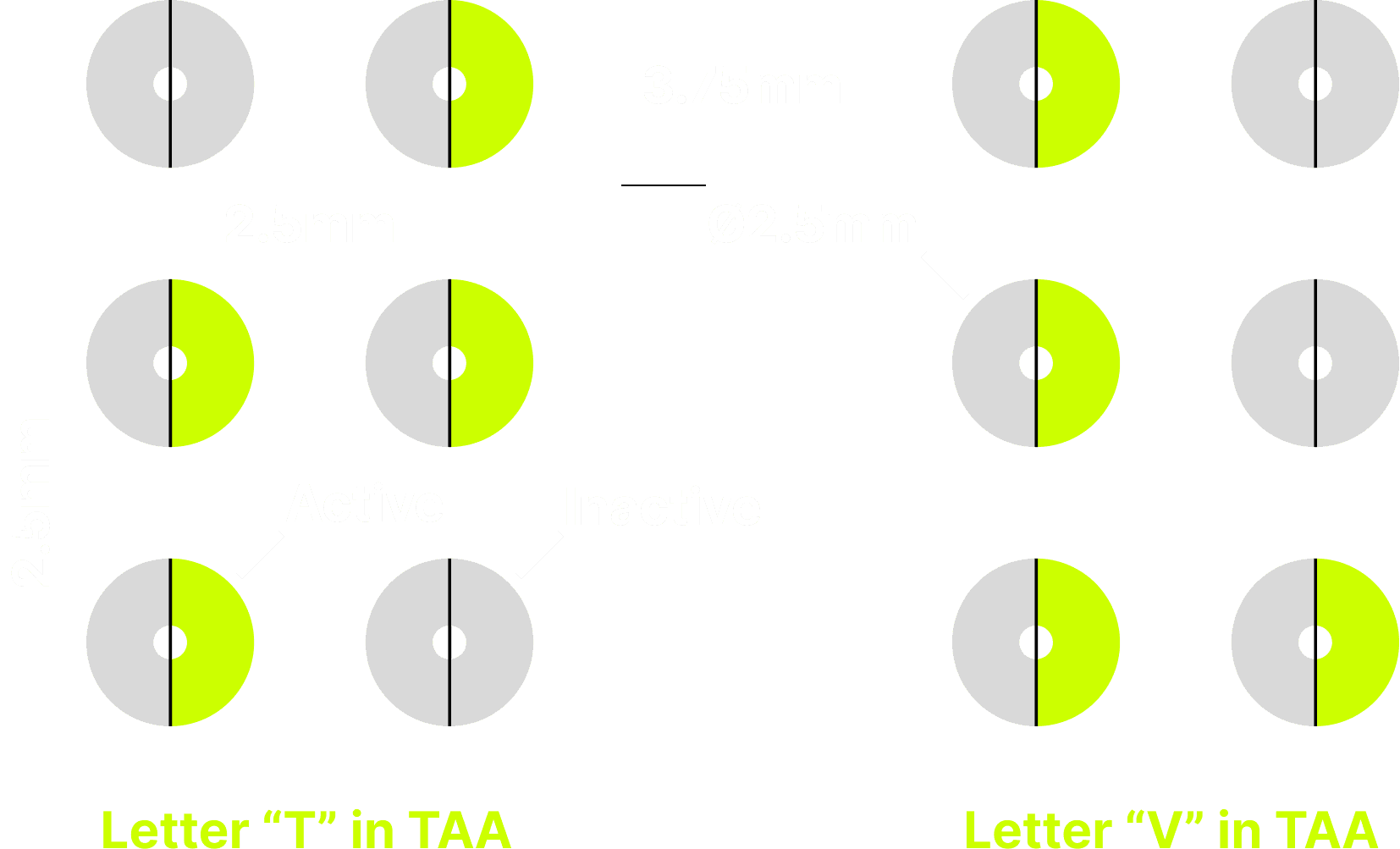
A Touch Actuators Array comprises six touch actuators spaced out according to the Braille standard size and layout. When outputting a letter or symbol, specific actuators are energized while others remain inactive. This design not only enables users to feel patterns, similar to traditional Braille, but also offers lower cost, rapid response, sensitivity adjustment, high durability, lightweight construction, zero noise, and weatherproof characteristics.
A Touch Actuators Array comprises six touch actuators spaced out according to the Braille standard size and layout. When outputting a letter or symbol, specific actuators are energized while others remain inactive. This design not only enables users to feel patterns, similar to traditional Braille, but also offers lower cost, rapid response, sensitivity adjustment, high durability, lightweight construction, zero noise, and weatherproof characteristics.
A Touch Actuators Array comprises six touch actuators spaced out according to the Braille standard size and layout. When outputting a letter or symbol, specific actuators are energized while others remain inactive. This design not only enables users to feel patterns, similar to traditional Braille, but also offers lower cost, rapid response, sensitivity adjustment, high durability, lightweight construction, zero noise, and weatherproof characteristics.
INITIAL PROTOTYPE
INITIAL PROTOTYPE
INITIAL PROTOTYPE
Prototype One
Prototype One
Prototype One
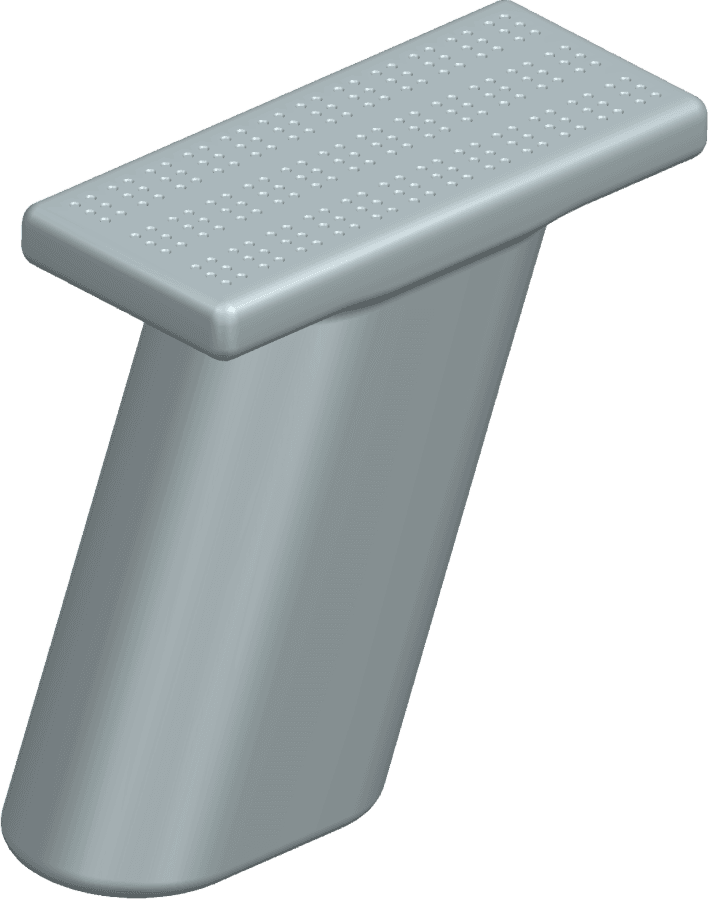
Drawing inspiration from gun handles, this first prototype investigates the design of ergonomic handles. To put the comfort and control of the user first, the emphasis is on experimenting with the ideal length, width, and shape.
Drawing inspiration from gun handles, this first prototype investigates the design of ergonomic handles. To put the comfort and control of the user first, the emphasis is on experimenting with the ideal length, width, and shape.
Drawing inspiration from gun handles, this first prototype investigates the design of ergonomic handles. To put the comfort and control of the user first, the emphasis is on experimenting with the ideal length, width, and shape.
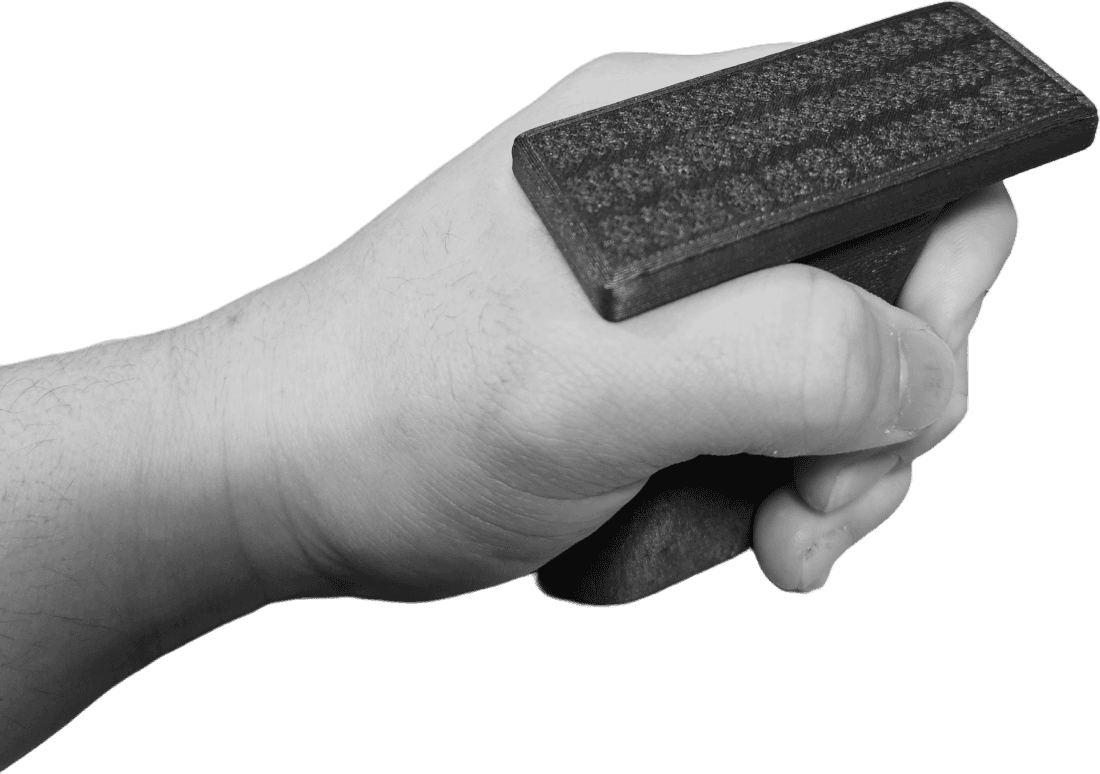
The handle is a touch too short and narrow.
The handle is a touch too short and narrow.
The handle is a touch too short and narrow.
The braille interface's sharp edge causes discomfort in the anatomic snuffbox of the hand.
The braille interface's sharp edge causes discomfort in the anatomic snuffbox of the hand.
The braille interface's sharp edge causes discomfort in the anatomic snuffbox of the hand.
The braille interface can be larger for enhanced functionality.
The braille interface can be larger for enhanced functionality.
The braille interface can be larger for enhanced functionality.
Prototype Two
Prototype Two
Prototype Two
In the second prototype, the elongated and widened handle ensures a firmer, more comfortable grip. The joint between the handle and the braille interface features a smoother edge blend, enhancing overall ease. Meanwhile, the braille interface is shifted back and expanded from 3 rows to 5, improving both functionality and user comfort.
In the second prototype, the elongated and widened handle ensures a firmer, more comfortable grip. The joint between the handle and the braille interface features a smoother edge blend, enhancing overall ease. Meanwhile, the braille interface is shifted back and expanded from 3 rows to 5, improving both functionality and user comfort.
In the second prototype, the elongated and widened handle ensures a firmer, more comfortable grip. The joint between the handle and the braille interface features a smoother edge blend, enhancing overall ease. Meanwhile, the braille interface is shifted back and expanded from 3 rows to 5, improving both functionality and user comfort.
The design could integrate side buttons or knobs for improved functionality.
The design could integrate side buttons or knobs for improved functionality.
The design could integrate side buttons or knobs for improved functionality.
The prototype, resembling a gun in overall shape, could be perceived as offensive and misleading to some people.
The prototype, resembling a gun in overall shape, could be perceived as offensive and misleading to some people.
The prototype, resembling a gun in overall shape, could be perceived as offensive and misleading to some people.
Prototype Three
Prototype Three
Prototype Three
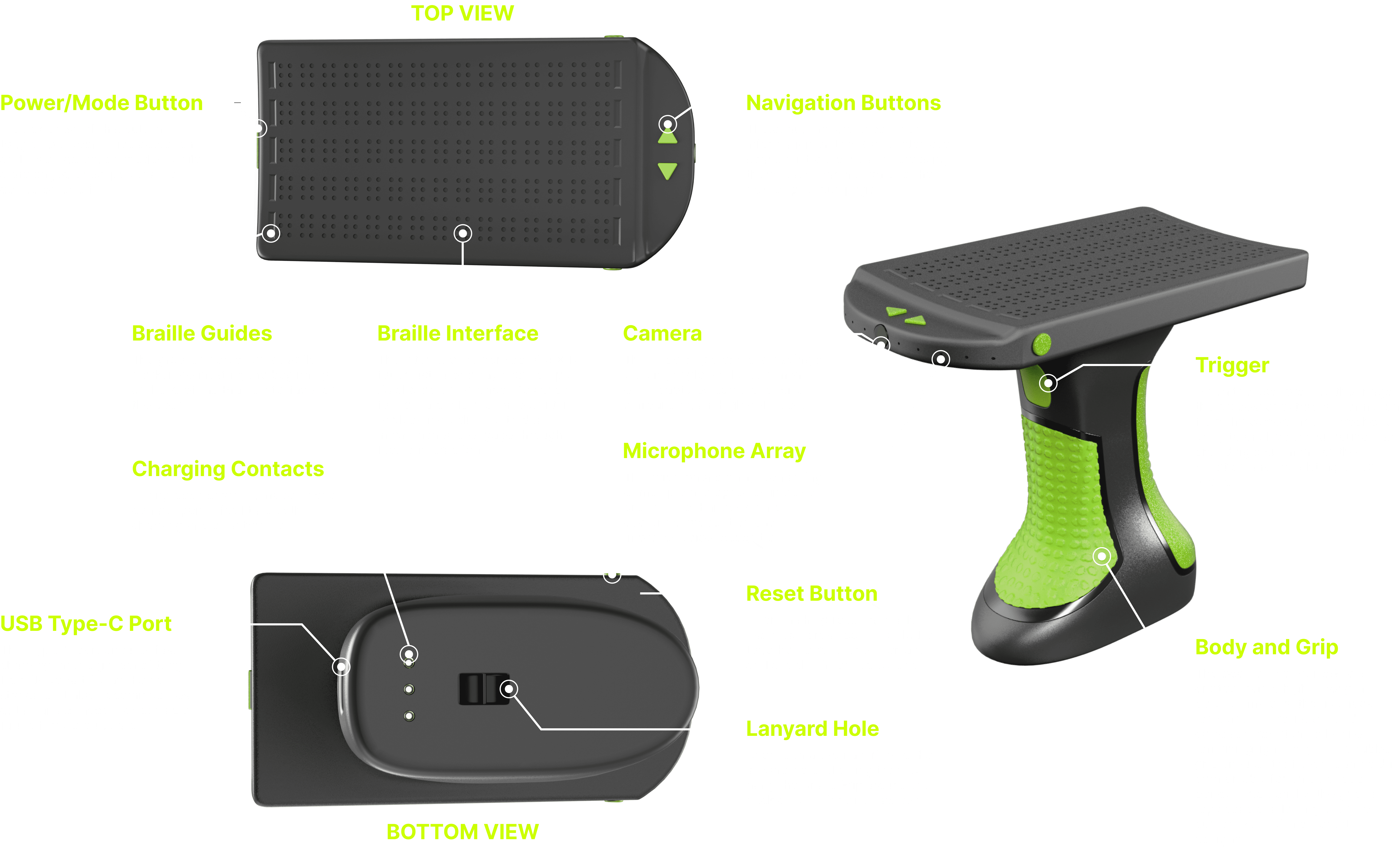
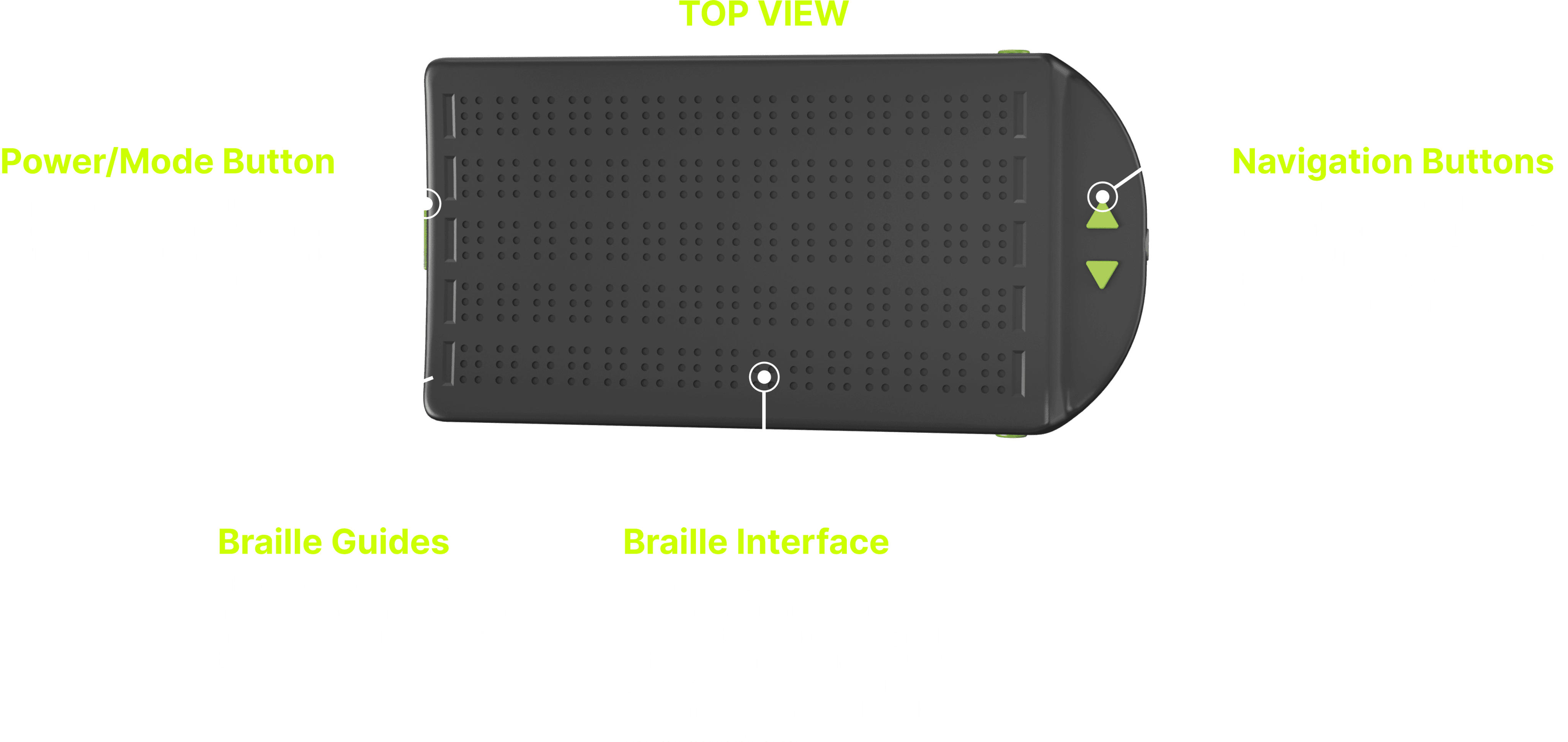
In the third prototype, ten notches are integrated on both sides of the braille interface to guide users on starting and ending points. Page up and down buttons have been introduced to assist in navigating through lengthy paragraphs, and additional function buttons are placed for enhanced usability.
In the third prototype, ten notches are integrated on both sides of the braille interface to guide users on starting and ending points. Page up and down buttons have been introduced to assist in navigating through lengthy paragraphs, and additional function buttons are placed for enhanced usability.
In the third prototype, ten notches are integrated on both sides of the braille interface to guide users on starting and ending points. Page up and down buttons have been introduced to assist in navigating through lengthy paragraphs, and additional function buttons are placed for enhanced usability.
Ergonomic design and even weight distribution enable prolonged comfort.
Ergonomic design and even weight distribution enable prolonged comfort.
Ergonomic design and even weight distribution enable prolonged comfort.
The curved front reduces the gun-like appearance for a more approachable design.
The curved front reduces the gun-like appearance for a more approachable design.
The curved front reduces the gun-like appearance for a more approachable design.
The hand can easily navigate through the function buttons.
The hand can easily navigate through the function buttons.
The hand can easily navigate through the function buttons.
FINAL PROTOTYPE PT1
FINAL PROTOTYPE PT1
FINAL PROTOTYPE PT1
FINAL PROTOTYPE PT2
FINAL PROTOTYPE PT2
FINAL PROTOTYPE PT2
CURRENT STATUS
CURRENT STATUS
CURRENT STATUS
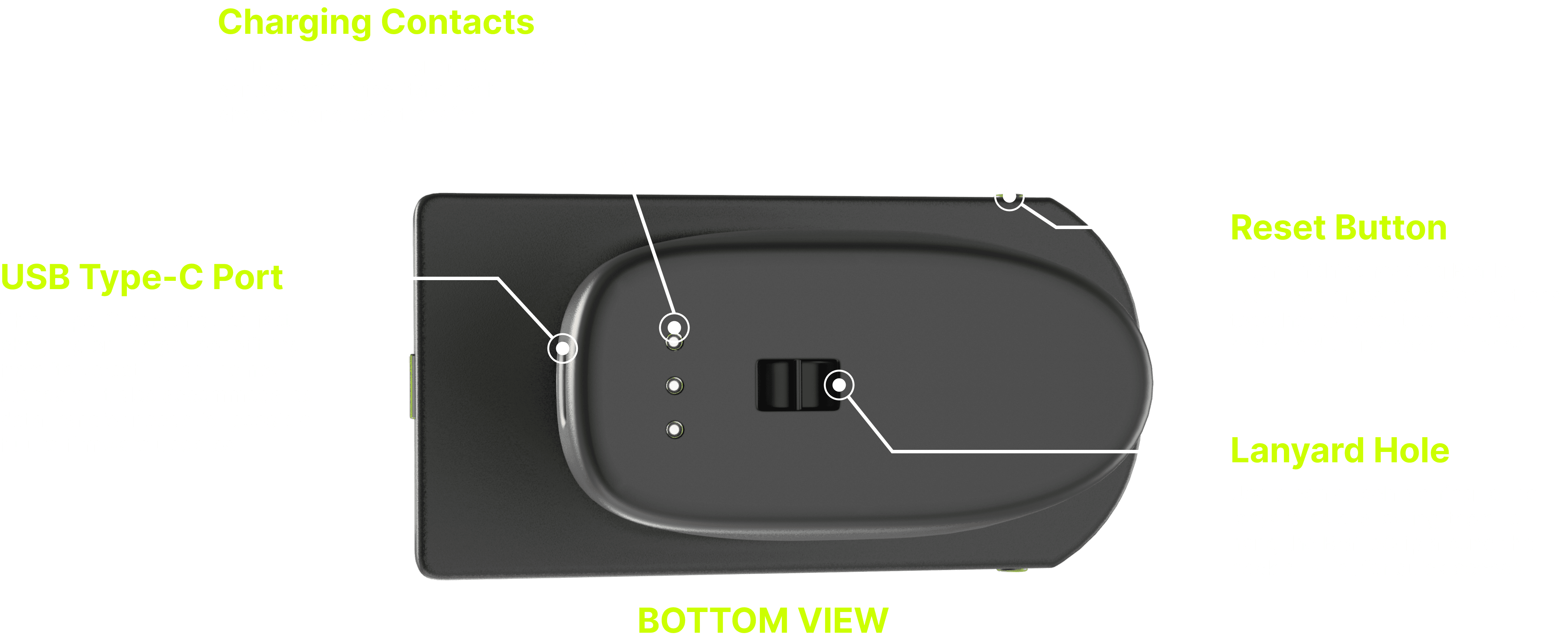
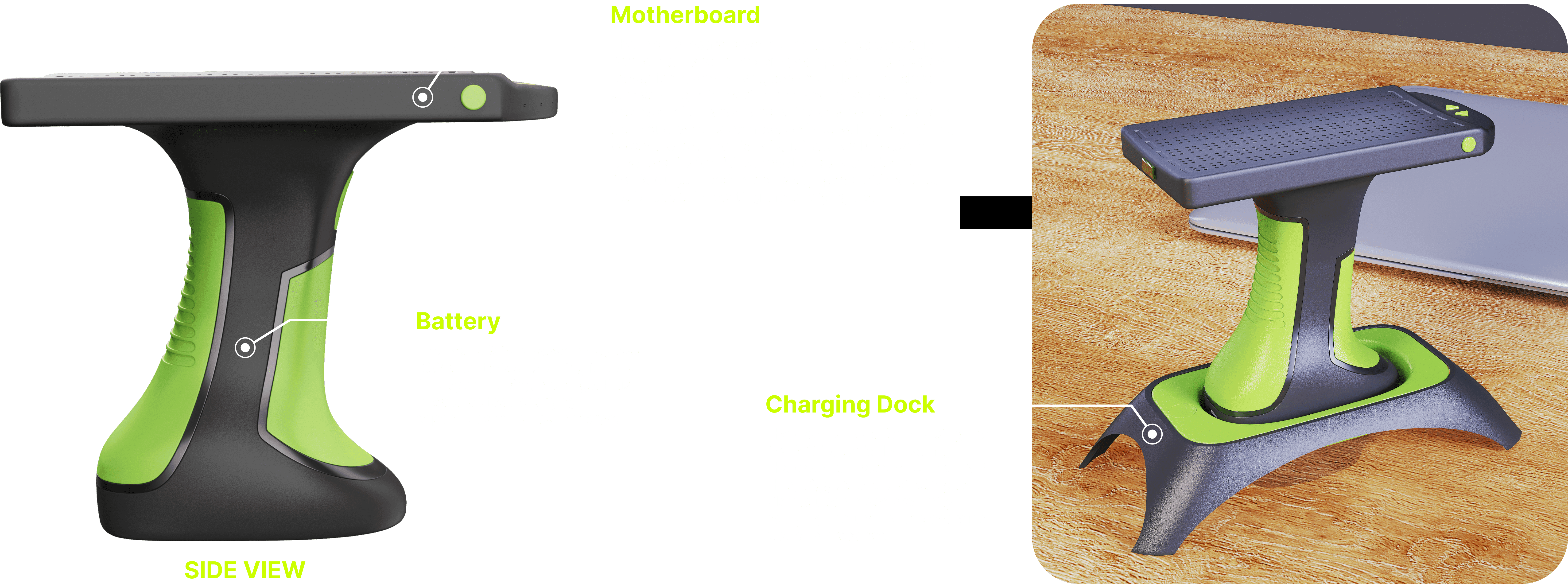
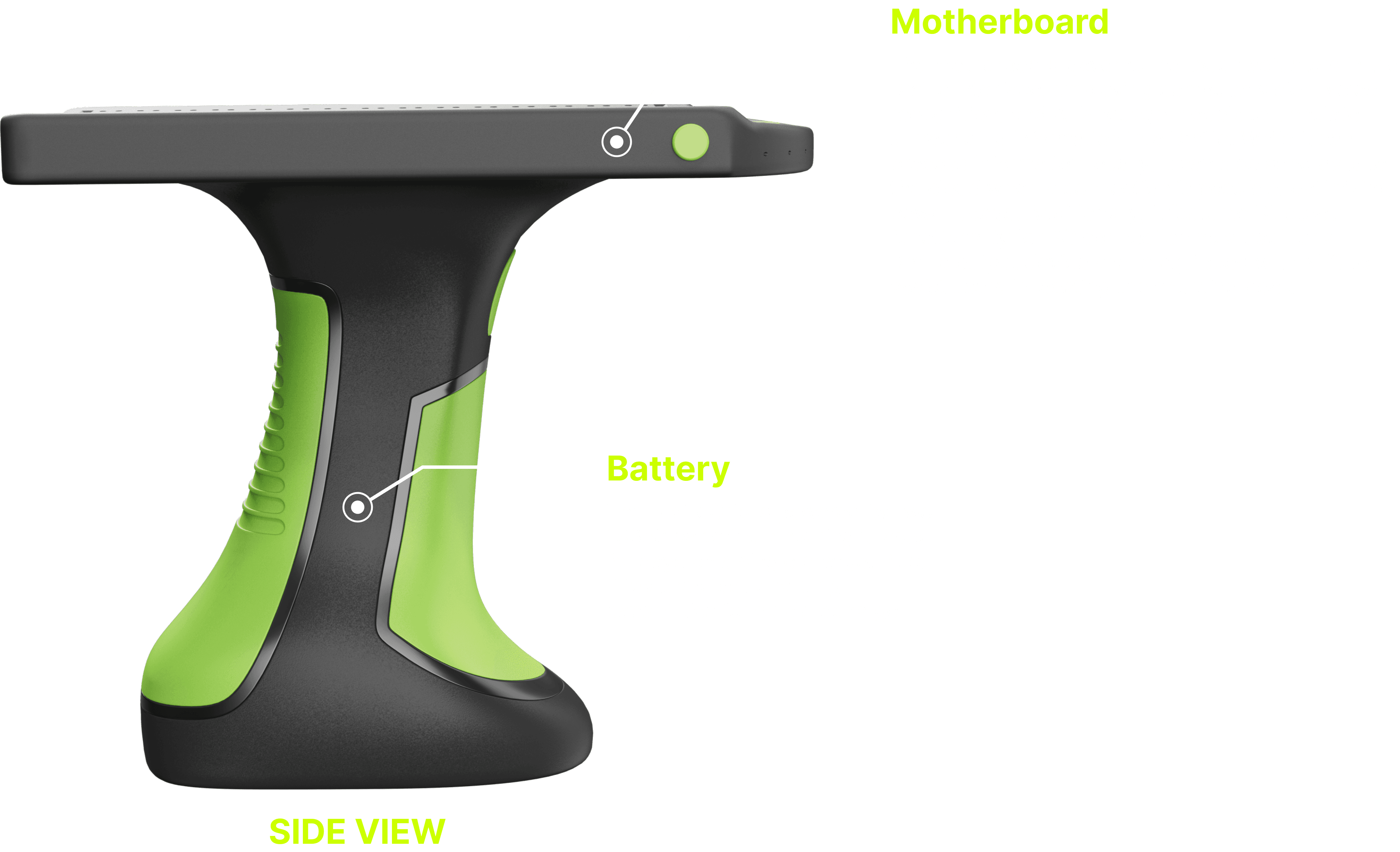
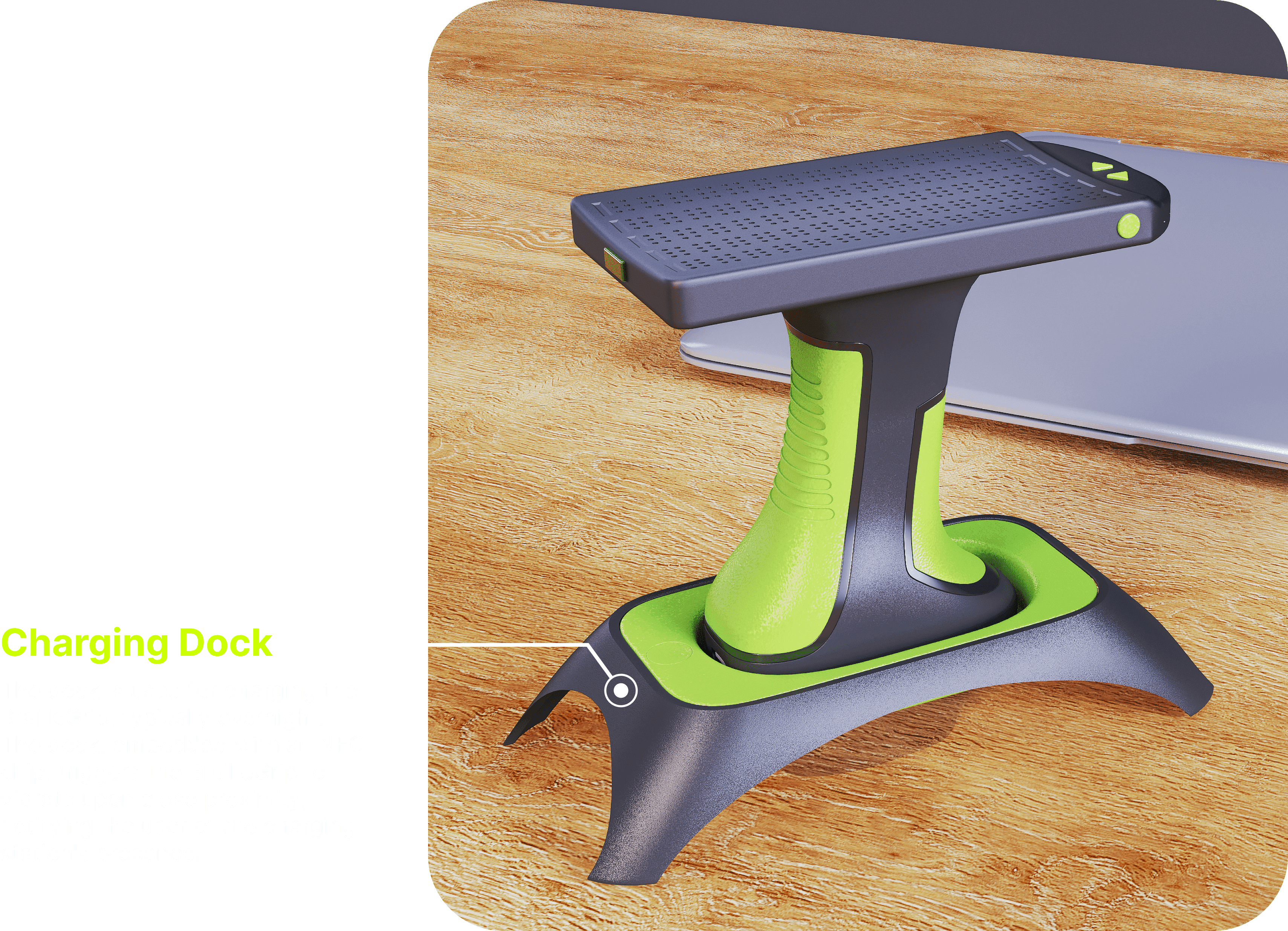
The BrailleGrip is currently in the conceptual phase, with the exterior design finalized after refinement through physical prototypes and blindfold tests, incorporating valuable input from friends and doctors at Samaritan Hospital near my school; The promising feedback received has resulted in subsequent adjustments. However, due to its compact size, the integration of electronics is still pending. Various components, including the motherboard and charging system, need to be custom-made. Additionally, a critical aspect is the testing of the touch actuators. To bring this concept to life, assembling a dedicated team is crucial, especially individuals with expertise in electronics.
The BrailleGrip is currently in the conceptual phase, with the exterior design finalized after refinement through physical prototypes and blindfold tests, incorporating valuable input from friends and doctors at Samaritan Hospital near my school; The promising feedback received has resulted in subsequent adjustments. However, due to its compact size, the integration of electronics is still pending. Various components, including the motherboard and charging system, need to be custom-made. Additionally, a critical aspect is the testing of the touch actuators. To bring this concept to life, assembling a dedicated team is crucial, especially individuals with expertise in electronics.
The BrailleGrip is currently in the conceptual phase, with the exterior design finalized after refinement through physical prototypes and blindfold tests, incorporating valuable input from friends and doctors at Samaritan Hospital near my school; The promising feedback received has resulted in subsequent adjustments. However, due to its compact size, the integration of electronics is still pending. Various components, including the motherboard and charging system, need to be custom-made. Additionally, a critical aspect is the testing of the touch actuators. To bring this concept to life, assembling a dedicated team is crucial, especially individuals with expertise in electronics.
NEXT STEP
NEXT STEP
NEXT STEP
For the next step, given the enthusiastic response to this concept, I'm assembling a team, including electronic engineer friends, to design a custom motherboard and source electronic components. Simultaneously, I'll refine the internal space of the BrailleGrip to meet their needs. We're planning to conduct lab tests on the touch actuators to ensure safety and reliability. In case the touch actuators don't work as intended, we have the option to revert to the traditional Braille interface, even though it would make the BrailleGrip bulkier and heavier. The ultimate goal is to make the BrailleGrip a cost-effective solution, enhancing accessibility for people with dual impairments. This project holds a promising future in significantly improving the lives of individuals with sensory challenges.
For the next step, given the enthusiastic response to this concept, I'm assembling a team, including electronic engineer friends, to design a custom motherboard and source electronic components. Simultaneously, I'll refine the internal space of the BrailleGrip to meet their needs. We're planning to conduct lab tests on the touch actuators to ensure safety and reliability. In case the touch actuators don't work as intended, we have the option to revert to the traditional Braille interface, even though it would make the BrailleGrip bulkier and heavier. The ultimate goal is to make the BrailleGrip a cost-effective solution, enhancing accessibility for people with dual impairments. This project holds a promising future in significantly improving the lives of individuals with sensory challenges.
For the next step, given the enthusiastic response to this concept, I'm assembling a team, including electronic engineer friends, to design a custom motherboard and source electronic components. Simultaneously, I'll refine the internal space of the BrailleGrip to meet their needs. We're planning to conduct lab tests on the touch actuators to ensure safety and reliability. In case the touch actuators don't work as intended, we have the option to revert to the traditional Braille interface, even though it would make the BrailleGrip bulkier and heavier. The ultimate goal is to make the BrailleGrip a cost-effective solution, enhancing accessibility for people with dual impairments. This project holds a promising future in significantly improving the lives of individuals with sensory challenges.